Before payroll
Find missing clock events and review worked time with breaks and idle periods accounted for.
Employee time tracking & workforce insights
Bring employee time tracking, attendance and work activity into one clear view. Spot missed hours, understand distractions and make your next team conversation more useful.
Free trials · R0 card setup · Up to 25 usersNo setup charge. Card verification required. Monthly billing starts after the trial unless cancelled. Only your selected paid user count is billed.
Less chasing. More understanding.
Scattered timesheets and isolated activity reports only tell part of the story. Connect attendance, breaks and application use so you can see what needs attention and why.
Give HR the exceptions to review, managers the context to support their people, and business owners a clearer picture of the working day.
Find missing clock events and review worked time with breaks and idle periods accounted for.
Understand work patterns and distractions, then ask better questions with the full context.
Use workplace data transparently, with clear policies and review in context.

Features
Use only the capabilities your plan and workplace policy require, then review them through the same company and department structure.
Track clock-ins, clock-outs, breaks and idle time, then review weekly payroll, overtime and missing-clock exceptions.
Understand applications, processes and supported browser URLs using app categories and flexible keyword rules.
Where enabled by the plan and company policy, capture interval screenshots and resource-conscious activity video.
Build a personal Today view from live KPI, chart and table widgets, with company, department, employee and date filters.
Arrange reusable data widgets on a report canvas, save company layouts and schedule designed reports for PDF email delivery.
See agent health, contact and upload queues, deliver controlled updates and use RemoteLink when included in the company plan.
Feature illustrations use example data. Available capabilities depend on the company plan and configuration.
Introducing HR for I.T Meet
The people behind the numbers, one call away. Bring colleagues and customers together with video, audio and screen sharing, right from your working day.
Included in the Essential Payroll plan
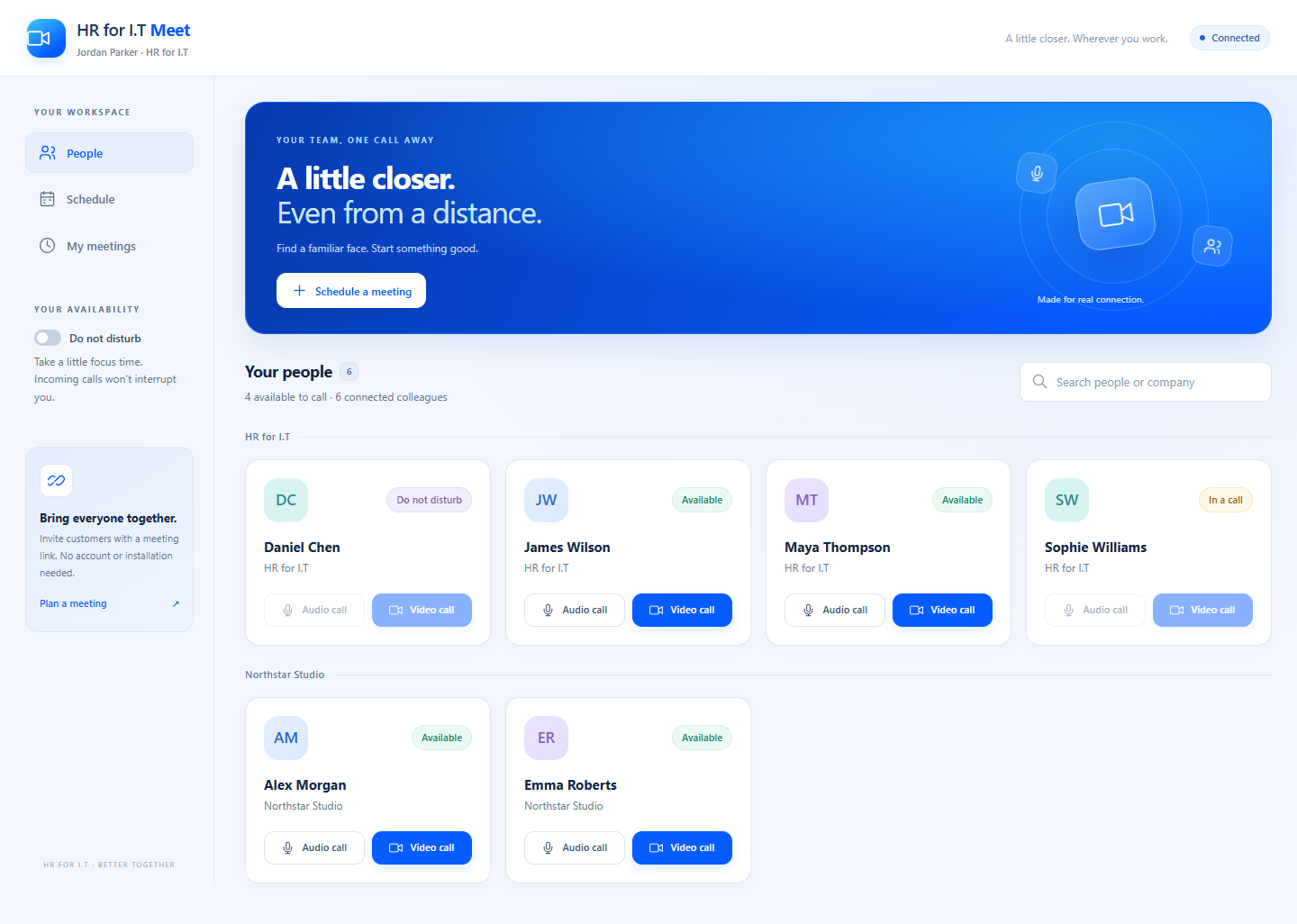
See who is available and start an audio or video conversation with a colleague.
Schedule a meeting and send a guest link. Customers join in their browser, without an account.
Share your screen and chat with up to eight participants, including the host.
Guest lobby and host controls. You choose when your camera and microphone are on. Meet requires platform setup and a supported browser or WebView2 runtime.
For your IT team · Active Directory
Install HR for I.T and keep your domain computers up to date—without asking employees for administrator access. Your IT team chooses the release, the computers and the timing.
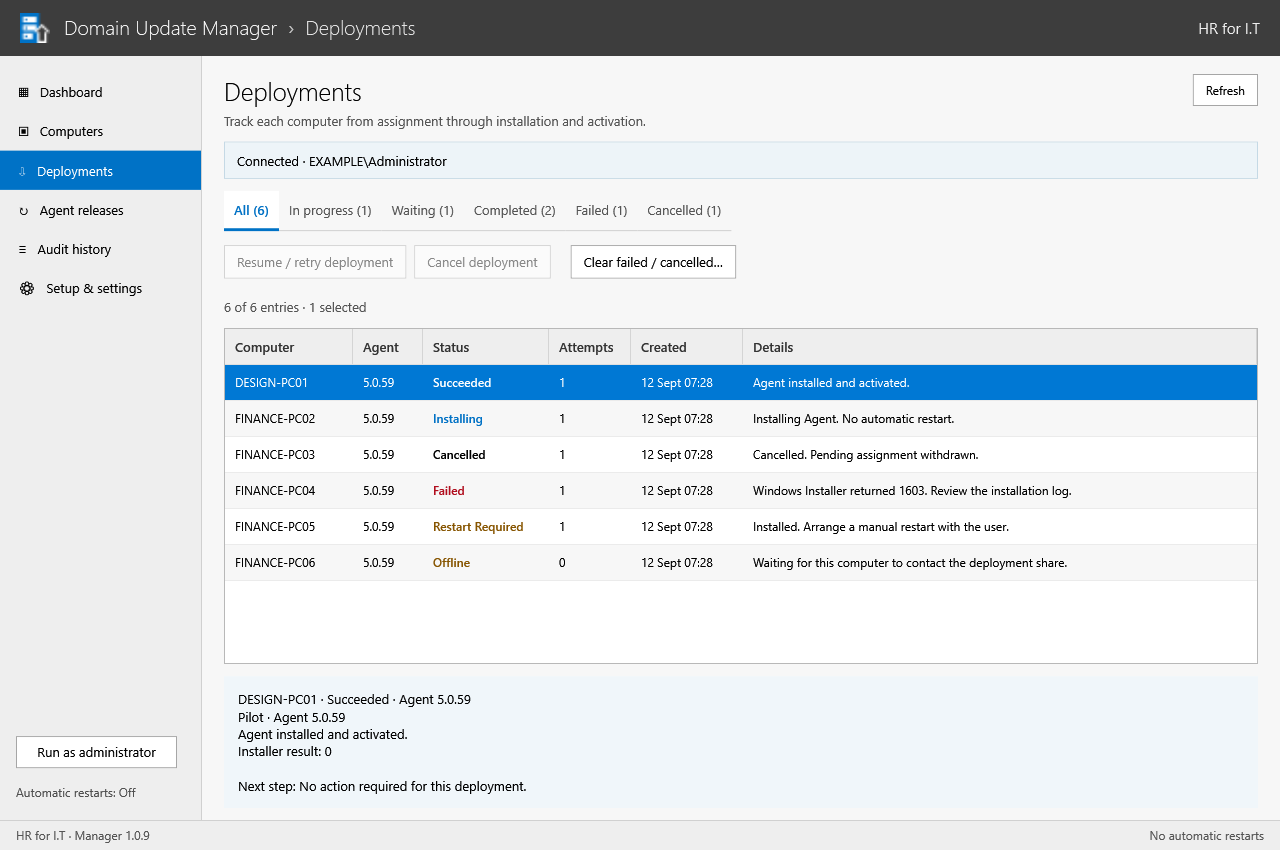
Deploy the Agent to selected domain computers, then manage updates from the same Windows application.
Approve signed releases, start with a pilot group and follow each computer’s installation result.
Deploy now or use a maintenance window. If a restart is needed, it’s flagged for your team—not triggered automatically.
Runs on a domain-joined Windows Server 2022 or 2025 with Desktop Experience. Designed for a single Active Directory domain.
Actual Manager interface with demo data. Screenshots are illustrative; your domain and licence availability will differ.
How it works
Configure the rules once, connect the team and turn live data into the view each manager needs.
Create the company and departments, assign the plan, set clock defaults and define the app categories and keywords that fit the work.
Install and activate the Windows agent with the company serial. Licensed activity, time and capture signals queue safely for delivery.
Use dashboards, payroll, department views and designed reports to find exceptions, understand patterns and support the right follow-up.
Security & governance
HR for I.T combines company and department boundaries, role-based portal access, authenticator 2FA, plan-controlled capabilities and retention settings. Pair those controls with a rollout that tells employees what is measured, why it matters and how the information will be used.
Plan a responsible rolloutHR for I.T is not built for covert monitoring. We recommend clear communication, policy alignment and evidence reviewed in context.
Keep users and report data inside authorised company and department boundaries.
Let portal users protect their account with a QR-based authenticator setup and recovery codes.
Enable capture and reporting by plan, with configured retention for logs and media.
Review portal navigation audit records and agent health diagnostics without blocking normal work.
A plan for your team
Choose your paid user count and billing cycle. Free trials include up to 25 users; only the selected paid count is billed afterwards. Need help choosing? Talk to our team ↗
Estimated R6,125/month for 35 seats
Unlimited users
14-day trial · R0 card setup Up to 25 trial users. Then R6,125/month for 35 selected paid users, unless cancelled. Extra trial users lose access; they are not automatically billed.
Estimated R9,625/month for 35 seats
Unlimited users
14-day trial · R0 card setup Up to 25 trial users. Then R9,625/month for 35 selected paid users, unless cancelled. Extra trial users lose access; they are not automatically billed.
Estimated R10,500/month for 35 seats
Unlimited users
14-day trial · R0 card setup Up to 25 trial users. Then R10,500/month for 35 selected paid users, unless cancelled. Extra trial users lose access; they are not automatically billed.
Estimated R1,575/month for 35 seats
Unlimited users
8-day trial · R0 card setup Up to 25 trial users. Then R1,575/month for 35 selected paid users, unless cancelled. Extra trial users lose access; they are not automatically billed.
Pricing note: prices exclude VAT. Billing and activation are confirmed before a company is provisioned.
Client experience
Real-world visibility that supports accountability, trust and better management decisions.
Our experience with the HR for IT system has been transformative. It’s not just about control; it’s about empowering productivity and creating a culture of accountability. Highly recommended!
Easy identification of unproductive sites or programs.
Visibility into staff activities, crucial for remote teams.
Ensures transparency and fosters confidence in distributed teams.
Common questions
Understand what’s included, how reporting works and what your team needs to get started.
Still have a question? Talk to our teamYes. HR for I.T Meet is included in the Essential Payroll plan. Eligible employees can call colleagues from the Windows widget or schedule customer meetings with a public guest link. Meetings support audio, video, screen sharing and chat for up to eight people, including the host. Customers join in their browser and wait for host admission. Your platform administrator must configure and enable Meet before use.
No. The recommended approach is transparent reporting, clear internal communication, policy alignment and evidence reviewed in context.
Depending on the company plan and configuration, the Windows agent can report time, idle periods, applications, processes, supported browser URLs, screenshots and activity video. Capture features can be left disabled when they are not required.
Clock and break records are kept separately from activity. Idle time while clocked in is reported, but it is excluded from worked time, and managers can review missing-clock and payroll exceptions.
Yes. Users can arrange live dashboard widgets, while company reports can be designed with filters, saved layouts and scheduled PDF email delivery.
The current production agent is built for Windows. The portal itself is browser-based. Additional desktop platforms are still being developed and are not represented as production-ready here.
The slider uses the current plan prices configured in the portal. VAT, payment and any custom scope are confirmed before provisioning.
Try it with your team
Bring everyone into the trial. Explore attendance, time tracking and the features in your chosen plan with up to 25 users.
Free trials up to 14 days on eligible monthly plans.
Choose a free trialPayFast verifies and saves your card. Nothing is deducted for trial setup.
Add up to 25 trial users, without increasing your agreed monthly bill.
After the trial, only the paid user count you selected is billed. Extra trial users lose access. Increase paid capacity explicitly, or cancel in Billing before the first charge.
Ready for a clearer operating view?
Find a plan that fits your people, or let us walk you through the product and answer your rollout questions.